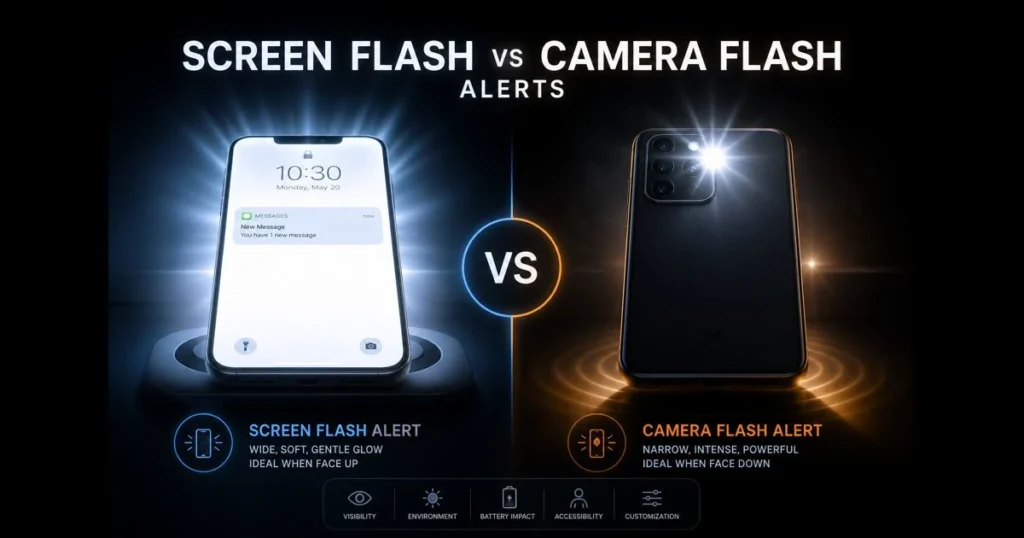
When your phone is silent or your smartwatch is hidden, a quick burst of light can mean the difference between catching an alert and missing it entirely. The screen flash vs camera flash debate revolves around context, comfort, and control. Screen-based HDR whites illuminate the entire display, while camera LEDs act like beacons. By understanding how each method operates, you can tailor smartphone notifications to fit your surroundings and preferences. This guide breaks down what each method does, their strengths and weaknesses, and how to optimize your device alerts. Related reading: samsung flash notification.
- Understanding Flash Alerts
- What is Screen Flash Notification?
- What is Camera Flash Alert?
- Comparing Screen Flash and Camera Flash Alerts
- When to Use Screen flash notifications
- When to Use Camera Flash Alerts
- User Preferences and Accessibility
- Future of Flash Alerts
1. Understanding Flash Alerts
Definition of flash alerts and their purpose.
Flash alerts are brief visual signals that use either the display or the camera’s LED to notify you of incoming calls, messages, timers, or app events. They complement sound and vibration alerts, creating a layered notification system that can penetrate noisy environments or quiet spaces where haptic feedback is muted. (See: Flash (photography) – Wikipedia.)
Overview of how flash alerts are used in different devices.
On smartphones, a screen flash temporarily increases the display’s white levels, while a camera flash alert pulses the rear LED. Tablets and laptops typically use screen flashes, although some feature subtle notification LEDs. Wearables primarily rely on displays and haptics. The shared goal remains clear: provide a quick, glanceable cue that respects your preferences while enhancing the user experience. Related reading: flash notifications battery drain.
2. What is Screen Flash Notification?
Explanation of screen flash notifications and how they function.
A screen flash notification briefly turns the display into a light source, often using a full-screen or banner-sized white overlay. Since the screen brightness is software-controlled, its intensity and duration can be adjusted for a gentle or bold effect. This method works well whether the device is on a desk or in your hand, spreading light broadly instead of in a narrow beam.
Some platforms allow customization of events that trigger screen flash notifications and whether the feature activates with the screen off. Options may include color accents around edges or a subtle status shade that fades in and out to minimize glare.
Examples of devices and scenarios where screen flash notifications are commonly used.
Screen flashes are prevalent on modern smartphones, found under Accessibility or Notifications settings. They are widely supported on Android devices and available on iOS with variations across alert types. You’ll also encounter screen flashes in video-call apps that light up for incoming calls and in timer or meditation apps that prefer soft cues over sound.
These notifications excel in face-up desk setups, nightstands where low-glare cues are preferred, and meetings where sound is off but a quick glow won’t distract others. Users who favor silent modes often combine flash notifications with gentle haptics for a balanced alert system.
3. What is Camera Flash Alert?
Description of camera flash alerts and their operational mechanics.
A camera flash alert utilizes the phone’s rear LED — the same diode used for photography — to emit bright light pulses when an event occurs. The LED fires in distinct short bursts, making it recognizable as a notification. Because the beam is directional, it’s easier to notice from across a room when the phone is face down or tucked away with the lens side outward.
Use cases for camera flash alerts in photography and notifications.
In photography, the LED illuminates subjects in low light and assists with autofocus. As a notification tool, it serves as a powerful strobe for calls, urgent app alerts, or critical reminders. The camera flash excels on hard surfaces where the light can reflect — think kitchen counters or car dashboards — making it ideal for users who keep their devices on silent but still need a strong visual cue.
4. Comparing Screen Flash and Camera Flash Alerts
Key differences in functionality and user experience.
Screen flashes are broad and soft, while camera LED flashes are narrow and intense. This distinction alters the user experience. A screen flash is easier on the eyes, producing less afterimage when looking at the device. Conversely, the camera LED, firing from the back, is more noticeable from odd angles and longer distances, though it can feel harsher in dim settings.
Directionality also plays a role. Screen flashes are most effective when the device faces you; camera flash alerts shine when the device is face down or across the room. For shared spaces, a screen glow is less intrusive, while the LED can draw attention like a mini strobe.
Popular devices showcase these approaches. On Apples iPhone, “LED Flash for Alerts” pulses the rear camera light for incoming calls, messages, and app notifications, with options to flash while unlocked or only when silent. Samsung Galaxy phones offer both “Screen flash notification,” which briefly brightens the display or triggers edge lighting, and “Camera flash notification,” which strobes the rear LED. These implementations are widely used because theyre easy to enable in Accessibility settings, highly visible in noisy spaces, and respectful in quiet ones when sound is off.
Pros and cons of each type of flash alert.
- Screen flash: Pros — Wide visibility when face up; adjustable intensity; customizable styles to reduce glare; better for reading alongside the cue.
- Screen flash: Cons — Less effective face down; can distract if you’re actively looking at content; bright whites may be stark in dark environments.
- Camera flash: Pros — Highly visible at a distance; effective when the phone is face down; cuts through bright environments.
- Camera flash: Cons — Can be jarring in low light; directional beam may be blocked; repeated bursts might disturb bystanders.
While some users express concerns about battery drain from flash notifications, the impact is generally minor compared to always-on screens or location services. Testing patterns and durations can help you find the right balance without overwhelming alerts.
5. When to Use Screen Flash Notifications
Ideal scenarios for utilizing screen flash notifications.
Opt for the screen flash when your phone is face up on a desk, dock, or nightstand. It’s ideal for softer cues that don’t disrupt others — during video meetings, at shared tables, or while someone sleeps beside you. If you rely on rich banners or lock-screen previews, pairing them with a screen flash keeps context and alerts cohesive.
Creative professionals often prefer this mode for color-sensitive tasks, as a brief white overlay is less disruptive than a rear LED blast reflecting off nearby objects. This approach is also suitable for classrooms and libraries where a diffused glow remains polite.
User preferences and accessibility considerations.
Light-sensitive individuals may find a tunable screen glow more comfortable than a sharp LED pulse. Many systems offer features to reduce flicker intensity, switch to edge lighting, or limit flashes to specific contacts and apps. If you establish a routine for focus time, consider scheduling screen flashes only for priority senders to minimize cognitive load.
6. When to Use Camera Flash Alerts
Situations where camera flash alerts are more effective.
Use the camera LED when you need visibility and impact. Workshops, gyms, kitchens, and outdoor areas with strong ambient light can obscure subtle cues; a camera flash alert cuts through the noise. It’s also helpful when the phone is face down — a common practice to limit distractions.
Parents or caregivers might use LED flashes to identify calls from specific numbers during nap time or when the device is across the room. For time-sensitive work, a strobing LED can serve as a decisive “look now” signal, even when your hands are occupied.
Impact of environmental factors on the choice of flash alerts.
Environment plays a crucial role in visibility. Bright daylight, reflective surfaces, and glass tables enhance the effectiveness of the camera LED, while plush fabrics or clutter may obstruct it. In contrast, a screen flash thrives in dim rooms and on matte surfaces but can disappear when the device is face down or in direct sunlight. Assess how you place your phone throughout the day, and choose the alert method that aligns with those conditions.
7. User Preferences and Accessibility
How personal preferences influence the choice of flash alert type.
Some users prefer subtle cues; others seek bold signals. Your tolerance for brightness, work environment, and device-checking habits all shape your ideal mix. If you lean toward minimalism, use screen flashes for priority calls only and rely on haptics for others. Conversely, if you’re often away from your phone, enable LED pulses for critical apps while muting less urgent notifications.
Accessibility features related to screen and camera flash alerts.
Both iOS and Android provide visual alerts under Accessibility settings for users who are Deaf or hard of hearing. There are options for screen-based cues, camera LED pulses, and sometimes color or pattern distinctions. Some Android devices, like those from Samsung, offer visual options such as edge lighting for less intense cues at night and brighter alerts during the day.
Keep in mind that flash notifications are just one aspect of accessibility. Combine them with custom vibration patterns, notification summaries, and per-app quiet hours to create a supportive alert system.
8. Future of Flash Alerts
Emerging technologies that may change how flash alerts are implemented.
Expect smarter, more nuanced light rather than just brighter displays. Advances in display technology could allow for illuminating only parts of the screen, such as a subtle corner pulse or a ring around the camera cutout, to avoid glare. Cameras and ambient sensors could estimate room brightness, adjusting alert intensity to prevent blinding bursts at night while enhancing visibility in bright environments.
Wearables are also moving toward context-aware cues. Imagine your watch confirming a high-priority call with a coordinated light pulse while your phone remains dark on the table, or your earbuds dimming an alert when they detect you’re looking at the screen.
Predictions for user interaction with flash alerts in upcoming devices.
Personalization will evolve from manual settings to intent-based profiles. You’ll specify outcomes — like “don’t miss urgent calls but stay subtle otherwise” — and the system will manage screen, LED, and haptic alerts accordingly. Developers may introduce “visual severity” levels, allowing urgent updates to trigger a brief LED pulse while routine notifications remain silent.
Ultimately, users will expect visual alerts that consider context: softer while reading, bolder when the device is unattended, and consistently aligned with their priorities.
Ready to choose between screen and camera flash notifications? Start by assessing where your phone rests during the day, enabling the mode that best suits that placement. Adjust durations and contacts over a week. If your needs shift—like during travel or on-call duty—switch profiles instead of settling for a one-size-fits-all solution. Thoughtful flash notifications can make your tech feel quieter and more responsive. Try a small change today and notice what you stop missing.
Frequently Asked Questions
What is the difference between screen flash and camera flash?
In notifications, screen flash is a visual alert that briefly brightens or flashes your devices display to signal incoming calls, messages, or app events. Camera flash alerts use the phones rear LED to pulse bright light for the same purpose. Screen flashes are broad and softer; camera LED flashes are more intense and directional.
When should I use screen flash instead of camera flash?
Screen flash is ideal for low-light selfies or when you want a more natural look, as it tends to reduce harsh shadows. Camera flash is better suited for capturing subjects in complete darkness or when you need to freeze motion with a more powerful light source.
Can screen flash and camera flash be used together?
Yes, using both can enhance photo quality, especially in complex lighting situations. The screen flash can provide fill light to soften shadows, while the camera flash can illuminate the subject more effectively.